
29 KiB
Zabbix GraphQL API
A GraphQL wrapper for the Zabbix API that provides enhanced mass import/export operations, hierarchical host group management, and dynamic schema extensibility. Built with Apollo Server, TypeScript, and ES modules.
🚀 Features
-
GraphQL Interface: Modern GraphQL API wrapping Zabbix functionality
- Reference:
schema/queries.graphql,schema/mutations.graphql,src/api/start.ts
- Reference:
-
Hierarchical Data Mapping: Automatic mapping of Zabbix items/tags to nested GraphQL objects
- Reference:
src/api/resolver_helpers.ts,schema/device_value_commons.graphql,docs/sample_all_devices_query.graphql
- Reference:
-
Mass Operations: Import/export capabilities for hosts, templates, and user rights
- Reference:
schema/mutations.graphql(importHosts, importTemplates, importUserRights, etc.),docs/sample_import_*.graphql
- Reference:
-
Dynamic Schema Extension: Extend the schema without code changes using environment variables
- Reference:
src/api/schema.ts,schema/extensions/,src/common_utils.ts(ADDITIONAL_SCHEMAS, ADDITIONAL_RESOLVERS)
- Reference:
-
Permission System: Role-based access control using Zabbix template groups
- Reference:
schema/api_commons.graphql(Permission enum, PermissionRequest),src/api/resolvers.ts(hasPermissions, userPermissions),docs/sample_import_permissions_template_groups_mutation.graphql
- Reference:
-
Real-time Subscriptions: WebSocket support for GraphQL subscriptions (infrastructure implemented, but no actual subscriptions defined in schema)
- Reference:
src/api/start.ts(WebSocketServer integration withgraphql-ws),AGENTS.md(mentions WebSocket support),package.json(graphql-ws, subscriptions dependencies)
- Reference:
-
Type Safety: Full TypeScript support with generated types
- Reference:
codegen.ts,src/schema/generated/graphql.ts,tsconfig.json,package.json(devDependencies for GraphQL Codegen)
- Reference:
📋 Prerequisites
Before you begin, ensure you have met the following requirements:
- Node.js >= 18.x (tested with v21.5.0)
- NPM >= 8.x
- Zabbix Server with API access
- Zabbix Super Admin Token (for full functionality)
🛠️ Installation
Clone the repository
git clone https://github.com/your-repo/zabbix-graphql-api.git
cd zabbix-graphql-api
Install dependencies
npm install
⚙️ Configuration
Environment Variables
Create a .env file in the project root with the following variables:
# Zabbix connection
ZABBIX_BASE_URL=http://your-zabbix-server/zabbix
ZABBIX_AUTH_TOKEN=your-super-admin-token
ZABBIX_AUTH_TOKEN_FOR_REQUESTS=your-super-admin-token

# Optional configuration
ZABBIX_EDGE_DEVICE_BASE_GROUP=Roadwork
ZABBIX_ROADWORK_BASE_GROUP=Roadwork
ZABBIX_PERMISSION_TEMPLATE_GROUP_NAME_PREFIX=Permissions
SCHEMA_PATH=./schema/

# Dynamic schema extension (optional)
ADDITIONAL_SCHEMAS=./schema/extensions/display_devices.graphql,./schema/extensions/location_tracker_devices.graphql
ADDITIONAL_RESOLVERS=SinglePanelDevice,FourPanelDevice,DistanceTrackerDevice

# Logging
LOG_LEVELS=info
Environment Variable Details
| Variable | Description | Default | Required |
|---|---|---|---|
ZABBIX_BASE_URL |
URL to your Zabbix server (include /zabbix path) |
- | Yes |
ZABBIX_AUTH_TOKEN |
Zabbix Super Admin API token for administrative operations (full permissions needed for import/export operations) | - | Yes |
ZABBIX_AUTH_TOKEN_FOR_REQUESTS |
Token used for automated requests (can be same as ZABBIX_AUTH_TOKEN or a different token with limited permissions for routine operations) | - | Yes* |
ZABBIX_EDGE_DEVICE_BASE_GROUP |
Base group for edge devices | - | No |
ZABBIX_ROADWORK_BASE_GROUP |
Base group for roadwork devices | - | No |
ZABBIX_PERMISSION_TEMPLATE_GROUP_NAME_PREFIX |
Prefix for permission template groups (used to identify permission-related template groups in Zabbix) | Permissions |
No |
SCHEMA_PATH |
Path to schema files | ./schema/ |
No |
ADDITIONAL_SCHEMAS |
Comma-separated list of additional schema files | - | No |
ADDITIONAL_RESOLVERS |
Comma-separated list of resolver types to generate | - | No |
LOG_LEVELS |
Log level configuration | - | No |
DRY_RUN |
If set, runs in dry run mode without starting the server (exits immediately after initialization, useful for testing configuration) | - | No |
HOST_TYPE_FILTER_DEFAULT |
Default filter for host types | - | No |
HOST_GROUP_FILTER_DEFAULT |
Default filter for host groups | - | No |
*Note: ZABBIX_AUTH_TOKEN_FOR_REQUESTS is required when different from ZABBIX_AUTH_TOKEN, otherwise the same token will be used for all operations.
Authentication Tokens Explanation
The API supports two different authentication tokens for security separation:
ZABBIX_AUTH_TOKEN: Used for administrative operations like import/export, requires Super Admin privilegesZABBIX_AUTH_TOKEN_FOR_REQUESTS: Used for routine read operations, can have limited permissions
Edge Device Group Pattern
The ZABBIX_EDGE_DEVICE_BASE_GROUP (or ZABBIX_ROADWORK_BASE_GROUP) is used to create a regex pattern FIND_ZABBIX_EDGE_DEVICE_BASE_GROUP_PREFIX that identifies edge device groups in Zabbix. This pattern follows the format ^(${ZABBIX_EDGE_DEVICE_BASE_GROUP})\/ and is used to filter and process edge device related data.
Configuration Examples
Development Configuration (.env.development)
# Zabbix connection
ZABBIX_BASE_URL=http://localhost:8080/zabbix
ZABBIX_AUTH_TOKEN=your-dev-super-admin-token
ZABBIX_AUTH_TOKEN_FOR_REQUESTS=your-dev-super-admin-token

# Optional configuration for development
ZABBIX_EDGE_DEVICE_BASE_GROUP=DevEdge
ZABBIX_ROADWORK_BASE_GROUP=DevRoadwork
ZABBIX_PERMISSION_TEMPLATE_GROUP_NAME_PREFIX=Permissions
SCHEMA_PATH=./schema/
LOG_LEVELS=debug

# Dynamic schema extension (optional)
ADDITIONAL_SCHEMAS=./schema/extensions/display_devices.graphql,./schema/extensions/location_tracker_devices.graphql
ADDITIONAL_RESOLVERS=SinglePanelDevice,FourPanelDevice,DistanceTrackerDevice
Production Configuration (.env.production)
# Zabbix connection
ZABBIX_BASE_URL=https://zabbix.company.com/zabbix
ZABBIX_AUTH_TOKEN=your-prod-super-admin-token
ZABBIX_AUTH_TOKEN_FOR_REQUESTS=your-prod-read-only-token

# Production configuration
ZABBIX_EDGE_DEVICE_BASE_GROUP=ProductionEdge
ZABBIX_ROADWORK_BASE_GROUP=ProductionRoadwork
ZABBIX_PERMISSION_TEMPLATE_GROUP_NAME_PREFIX=Permissions
SCHEMA_PATH=./schema/
LOG_LEVELS=info

# Dynamic schema extension for production
ADDITIONAL_SCHEMAS=/app/schema/extensions/display_devices.graphql,/app/schema/extensions/location_tracker_devices.graphql
ADDITIONAL_RESOLVERS=SinglePanelDevice,FourPanelDevice,DistanceTrackerDevice

# Performance and operational settings
HOST_TYPE_FILTER_DEFAULT=device
HOST_GROUP_FILTER_DEFAULT=production
▶️ Running the Application
Development Mode
# Start with hot reloading
npm run start
The GraphQL API will be available at http://localhost:4000/
Available Queries and Mutations after start
Queries
apiVersion- Returns the API build versionzabbixVersion- Returns the version of the connected Zabbix instancelogin- Authenticates with Zabbix and returns an authentication tokenlogout- Logs out from Zabbix, invalidating the current sessionallHosts- Returns all hosts and their itemsallDevices- Returns all devices and their items (hosts with deviceType)allHostGroups- Returns all host groupslocations- Returns all locations used by hostsexportHostValueHistory- Exports value history for Zabbix itemsuserPermissions- Returns all user permissionshasPermissions- Checks if the current user has requested permissionsexportUserRights- Exports user rights (roles and groups)templates- Returns templatesallTemplateGroups- Returns all template groups
Mutations
createHost- Creates a single host in ZabbiximportHostGroups- Mass import Zabbix host groupsimportHosts- Mass import hosts and assign them to host groupsimportUserRights- Import user rights (roles and groups) into ZabbiximportTemplateGroups- Mass import template groupsimportTemplates- Mass import templatesdeleteTemplates- Delete templates by their IDs or by a name patterndeleteTemplateGroups- Delete template groups by their IDs or by a name pattern
Production Build
# Compile TypeScript
npm run compile

# Run production build
npm run prod
Available Scripts
| Script | Description |
|---|---|
npm run start |
Start development server with hot reload |
npm run compile |
Compile TypeScript to JavaScript |
npm run prod |
Run production build |
npm run test |
Run tests |
npm run codegen |
Generate TypeScript types from GraphQL schema |
npm run nodemon |
Alternative development runner |
🐳 Docker Deployment
Using Pre-built Images
The application can be deployed using Docker:
# Build the image
docker build -t zabbix-graphql-api .

# Run the container
docker run -d \
  --name zabbix-graphql \
  -p 4000:4000 \
  -e ZABBIX_BASE_URL=http://your-zabbix-server/zabbix \
  -e ZABBIX_AUTH_TOKEN=your-super-admin-token \
  zabbix-graphql-api
Building Your Own Image
# Build with custom API version
docker build --build-arg API_VERSION=v1.0.0 -t zabbix-graphql-api .

# Run with environment file
docker run -d \
  --name zabbix-graphql \
  -p 4000:4000 \
  --env-file .env \
  zabbix-graphql-api
🔐 Roles and Permissions Extension
The API implements a permission system using Zabbix template groups:
Permission Template Groups
- Template groups with prefix
Permissions/(configurable viaZABBIX_PERMISSION_TEMPLATE_GROUP_NAME_PREFIX) are used for permissions - Users gain permissions by being assigned to user groups that have access to these permission template groups
Available Permissions
The system supports three permission levels defined in schema/api_commons.graphql:
DENY: Explicitly denies access (supersedes other permissions)READ: Allows viewing/reading accessREAD_WRITE: Allows both reading and writing (implies READ permission)
Permission Object Names
Permission object names map to Zabbix template group paths: Permissions/{objectName}
GraphQL Permission Queries
# Check if current user has specific permissions
query HasPermissions {
  hasPermissions(permissions: [
    { objectName: "hosts", permission: READ },
    { objectName: "templates", permission: READ_WRITE }
  ])
}

# Get all user permissions
query GetUserPermissions {
  userPermissions(objectNames: ["hosts", "templates"])
}
Setting Up Permissions
- Create template groups with the prefix
Permissions/(e.g.,Permissions/hosts,Permissions/templates) - Assign these template groups to user groups in Zabbix with appropriate permission levels
- Users in those user groups will inherit the permissions
Detailed Permission Usage Examples
For comprehensive examples of permission usage patterns, see schema/api_commons.graphql which contains detailed documentation in the PermissionRequest input type comments, including real-world examples of how to model permissions for buttons, status controls, and application features.
See also docs/sample_import_permissions_template_groups_mutation.graphql for examples of importing permission template groups.
📊 Schema and Schema Extension
Main Schema Structure
The GraphQL schema is located in the schema/ directory and consists of:
queries.graphql- Query definitions (see detailed documentation in file comments)mutations.graphql- Mutation definitions (see detailed documentation in file comments)devices.graphql- Device-related types (see detailed documentation in file comments)zabbix.graphql- Zabbix-specific types (see detailed documentation in file comments)device_value_commons.graphql- Common value types (see detailed documentation in file comments)api_commons.graphql- Common API types and permission system (see detailed documentation in file comments)extensions/- Custom device type extensions
For comprehensive understanding of each operation, read the detailed comments in the respective schema files.
Zabbix to GraphQL Mapping
The API maps Zabbix entities to GraphQL types as follows:
| Zabbix Entity | GraphQL Type | Description |
|---|---|---|
| Host | Host / Device |
Represents a Zabbix host; Device is a specialized Host with a deviceType tag |
| Host Group | HostGroup |
Represents a Zabbix host group |
| Template | Template |
Represents a Zabbix template |
| Template Group | HostGroup |
Represents a Zabbix template group |
| Item | Nested fields in Device |
Zabbix items become nested fields in the device based on their key names |
| Tag | Tag |
Represents a Zabbix tag associated with a host or template |
| Inventory | Location |
Host inventory information maps to location data |
Zabbix Entity Relationships
- Host Groups: Organize hosts and templates hierarchically; represented as
HostGroupobjects in GraphQL - Templates: Contain items and other configuration that can be applied to hosts; linked via template groups
- Items: Individual metrics collected from hosts; automatically mapped to nested GraphQL fields based on their key names
- Tags: Metadata associated with hosts/templates; used for classification and filtering
Location Type Usage
The Location type represents geographical information from Zabbix host inventory:
- Fields: Includes
name,location_lat,location_lon, and other inventory attributes - Usage: Available through the
locationsquery and as part of host/device objects - Access: Retrieved via the
getLocationsmethod in the Zabbix API datasource
Dynamic Schema Extension
Extend the schema without code changes using environment variables:
ADDITIONAL_SCHEMAS=./schema/extensions/display_devices.graphql,./schema/extensions/location_tracker_devices.graphql
ADDITIONAL_RESOLVERS=SinglePanelDevice,FourPanelDevice,DistanceTrackerDevice
This enables runtime schema extension for custom device types without modifying the core code.
Sample Operations
For practical examples of schema usage, see the sample files in the docs/ directory:
docs/sample_all_devices_query.graphql- Example of querying all devicesdocs/sample_import_templates_mutation.graphql- Example of importing templatesdocs/sample_import_host_groups_mutation.graphql- Example of importing host groups
🗂️ Hierarchical Data Mapping
The API automatically maps Zabbix items to nested GraphQL objects using the createHierarchicalValueFieldResolver function:
- Zabbix item key
state.current.values.temperature→ GraphQL{ state: { current: { values: { temperature } } } } - Type hints:
json_,str_,bool_,float_prefixes for value conversion - Automatic resolution of hierarchical structures from flat Zabbix item keys
The createHierarchicalValueFieldResolver function (found in src/api/resolver_helpers.ts) dynamically creates resolvers that map Zabbix items or tags to hierarchical GraphQL structures. It uses field names and Zabbix item keys (dot-separated) to automatically resolve nested objects, eliminating the need for manual resolver definitions for each hierarchical field.
For detailed information about the mapping mechanism and type hinting, see the comments in schema/device_value_commons.graphql and src/api/resolver_helpers.ts.
See docs/sample_all_devices_query.graphql for examples of how hierarchical data appears in query results.
🏷️ Zabbix Tags Usage
Zabbix tags are used for:
- Device classification (
deviceTypetag) - Host categorization (
hostTypetag) - Custom metadata storage
- Permission assignment through template groups
For detailed information about tag usage and available tag types, see the comments in schema/devices.graphql and schema/zabbix.graphql.
See docs/sample_all_hosts_query.graphql and docs/sample_all_devices_query.graphql for examples of how tags appear in query results.
🧪 Testing
Run the test suite:
npm test
The testing strategy includes:
- Unit tests with mocked Zabbix API responses
- Integration tests with real GraphQL operations
- Permission system validation
- Import/export functionality testing
📖 Detailed Documentation Through Comments
This project uses extensive inline documentation in the form of comments within the GraphQL schema files and documentation samples. For the most comprehensive understanding of the API, its capabilities, and usage patterns, read the detailed comments in:
schema/queries.graphql- Complete documentation of all query operationsschema/mutations.graphql- Complete documentation of all mutation operations with usage examplesschema/api_commons.graphql- Detailed explanation of the permission system with real-world usage examplesdocs/*.graphql- Practical examples of all operations with sample variables and expected outcomes
The comments in these files contain real-world usage examples, implementation notes, and detailed explanations that go beyond what's covered in this README.
📖 Example: Extending Schema with Distance Tracker Device
Zabbix-Side Configuration
Before extending the schema, you need to configure Zabbix appropriately:
0. Template Group configuration
- Create a template group
Templates/Roadwork/Devices
1. Host Configuration in Zabbix
- Create a host in Zabbix with the tag
deviceTypeset todistance-tracker - Add items to the host with hierarchical keys that match your GraphQL fields:
distance.current(for thedistancefield)battery.level(for thebatteryLevelfield)status.lastSeen(for thelastSeenfield)location.latitudeandlocation.longitude(for thelocationobject)
2. Item Key Naming Convention
The API automatically maps dotted item keys to nested GraphQL objects:
- Zabbix item key
distance.current→ GraphQL{ distance } - Zabbix item key
battery.level→ GraphQL{ batteryLevel } - Zabbix item key
location.latitude→ GraphQL{ location: { location_lat } }
Schema Extension Steps
1. Create Schema Extension
Create schema/extensions/distance_tracker_device.graphql:
type DistanceTrackerDevice {
  id: String
  name: String
  location: Location
  distance: Float
  batteryLevel: Float
  lastSeen: DateTime
}
2. Configure Environment Variables
ADDITIONAL_SCHEMAS=./schema/extensions/distance_tracker_device.graphql
ADDITIONAL_RESOLVERS=DistanceTrackerDevice
3. Import Template via GraphQL Mutation
Instead of manually creating items in Zabbix, you can import a complete template using the GraphQL API:
mutation ImportDistanceTrackerTemplate($templates: [CreateTemplate!]!) {
  importTemplates(templates: $templates) {
    host
    templateid
    message
    error {
      message
      code
      data
    }
  }
}
Variables:
{
  "templates": [
    {
      "host": "DISTANCE_TRACKER",
      "name": "Distance Tracker Device Template",
      "groupNames": ["Templates/Roadwork/Devices"],
      "tags": [
        { "tag": "deviceType", "value": "DistanceTrackerDevice" }
      ],
      "items": [
        {
          "name": "Distance Current Value",
          "type": 0,
          "key": "distance.current",
          "value_type": 0,
          "history": "7d",
          "units": "m"
        },
        {
          "name": "Battery Level",
          "type": 0,
          "key": "battery.level",
          "value_type": 0,
          "history": "7d",
          "units": "%"
        },
        {
          "name": "Last Seen Timestamp",
          "type": 0,
          "key": "status.lastSeen",
          "value_type": 4,
          "history": "30d"
        },
        {
          "name": "Location Latitude",
          "type": 0,
          "key": "location.latitude",
          "value_type": 0,
          "history": "30d",
          "units": "deg"
        },
        {
          "name": "Location Longitude",
          "type": 0,
          "key": "location.longitude",
          "value_type": 0,
          "history": "30d",
          "units": "deg"
        }
      ]
    }
  ]
}
This creates a template in Zabbix with all the required items that map to your GraphQL fields.
4. Link Hosts to the Template
After importing the template, link your hosts to it in Zabbix or via the importHosts mutation:
mutation ImportHosts($hosts: [CreateHost!]!) {
  importHosts(hosts: $hosts) {
    deviceKey
    hostid
    message
    error {
      message
      code
      data
    }
  }
}
Variables:
{
  "hosts": [
    {
      "deviceKey": "DistanceTracker001",
      "name": "Distance Tracker 001",
      "deviceType": "distance-tracker",
      "groupNames": ["Roadwork/Devices"],
      "templateids": [12345]  // Use the templateid returned from importTemplates
    }
  ]
}
5. Use in Queries
Once the template and host are set up in Zabbix, query the data via GraphQL:
query GetDistanceTrackers {
  allDevices(tag_deviceType: ["distance-tracker"]) {
    ... on DistanceTrackerDevice {
      id
      name
      location {
        name
        location_lat
        location_lon
      }
      distance
      batteryLevel
      lastSeen
    }
  }
}
6. Expected Response Structure
Based on the Zabbix configuration above, the API will return:
{
  "data": {
    "allDevices": [
      {
        "id": "12345",
        "name": "Distance Tracker 001",
        "location": {
          "name": "Main Office",
          "location_lat": "37.7749",
          "location_lon": "-122.4194"
        },
        "distance": 42.5,
        "batteryLevel": 87.2,
        "lastSeen": "2023-10-15T10:30:00Z"
      }
    ]
  }
}
🤝 Contributing
- Fork the repository
- Create a feature branch (
git checkout -b feature/amazing-feature) - Commit your changes (
git commit -m 'Add amazing feature') - Push to the branch (
git push origin feature/amazing-feature) - Open a Pull Request
🏗️ Architecture
The Zabbix GraphQL API follows a layered architecture pattern with clear separation of concerns:
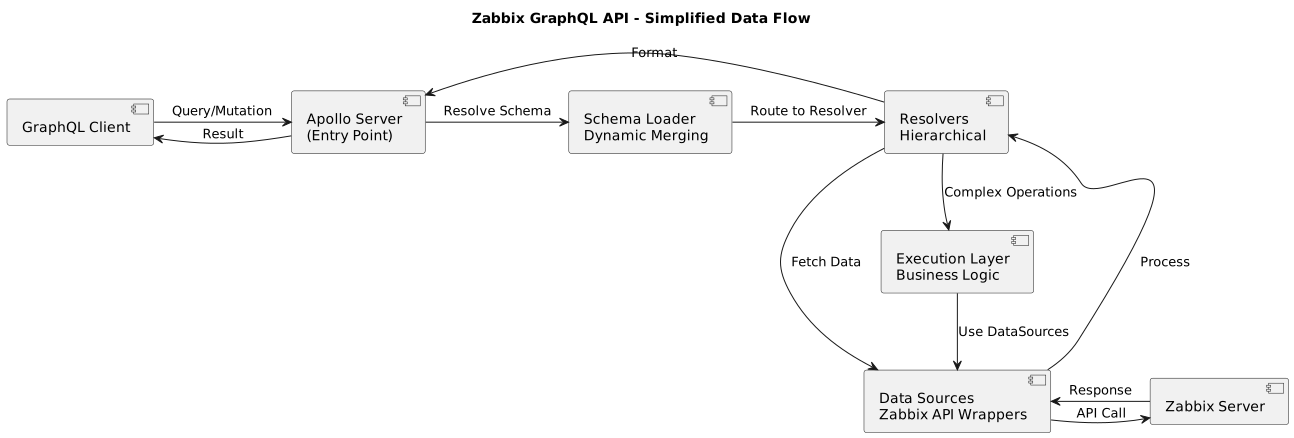
@startuml
title Zabbix GraphQL API - Simplified Data Flow

[GraphQL Client] as client
[Apollo Server\n(Entry Point)] as server
[Schema Loader\nDynamic Merging] as schema
[Resolvers\nHierarchical] as resolvers
[Data Sources\nZabbix API Wrappers] as datasources
[Zabbix Server] as zabbix
[Execution Layer\nBusiness Logic] as execution

client -> server : "Query/Mutation"
server -> schema : "Resolve Schema"
schema -> resolvers : "Route to Resolver"
resolvers -> datasources : "Fetch Data"
datasources -> zabbix : "API Call"
zabbix -> datasources : "Response"
datasources -> resolvers : "Process"
resolvers -> server : "Format"
server -> client : "Result"

resolvers --> execution : "Complex Operations"
execution --> datasources : "Use DataSources"
@enduml
Core Components
- Entry Point:
src/index.ts→src/api/start.ts(Apollo Server setup) - Schema Loading:
src/api/schema.ts- Dynamic schema merging with extensibility via environment variables - Resolvers:
src/api/resolvers.ts+ dynamic hierarchical resolvers viaresolver_helpers.ts - DataSources:
src/datasources/- Zabbix API wrappers extendingRESTDataSource - Execution:
src/execution/- Complex business logic (importers, deleters)
Data Flow
- Client Request: GraphQL queries/mutations arrive at the Apollo Server
- Schema Resolution: Schema loader merges base schema with additional schemas (if configured)
- Resolver Execution: Resolvers handle the request, using data sources to communicate with Zabbix
- Zabbix Communication: Data sources make API calls to the Zabbix server
- Response Processing: Results are processed and returned to the client
DataSources Structure
The src/datasources/ directory contains specialized Zabbix API wrappers:
zabbix-api.ts: Main Zabbix API class extendingRESTDataSource, handles authentication and communicationzabbix-{entity}.ts: Specialized request classes for specific Zabbix entities (e.g., hosts, templates, etc.)- Each DataSource follows the pattern of extending
ZabbixRequest<T>for type-safe API calls
Key Architectural Patterns
1. Hierarchical Data Mapping
Automatic mapping of Zabbix items/tags to GraphQL nested objects:
- Zabbix item key
state.current.values.temperature→ GraphQL{ state: { current: { values: { temperature } } } } - Implemented via
createHierarchicalValueFieldResolver()inresolver_helpers.ts - Type hints:
json_,str_,bool_,float_prefixes for value conversion
2. Dynamic Schema Extension (No-Code)
Configure via environment variables:
ADDITIONAL_SCHEMAS=./schema/extensions/display_devices.graphql,./schema/extensions/location_tracker_devices.graphql
ADDITIONAL_RESOLVERS=SinglePanelDevice,FourPanelDevice,DistanceTrackerDevice
3. Mass Import/Export Pattern
All importers follow hierarchy-first approach:
- Host Groups: Process parent groups before children (
getHostGroupHierarchyNames()) - Template Dependencies: Handle dependent items via deferred creation logic
- Batch Processing: Each importer returns array of
Responseobjects with success/error details
4. Permission System
Uses Zabbix template groups as permission containers:
- Template groups with prefix
Permissions/(configurable viaZABBIX_PERMISSION_TEMPLATE_GROUP_NAME_PREFIX) - Queries:
hasPermissions(),userPermissions()in resolvers - Integration:
ZabbixRequestWithPermissionswrapper class
📄 License
This project is licensed under the AGPL-3.0 License - see the LICENSE file for details.
📚 Schema and Documentation
Schema Files as Documentation
The schema files in the schema/ directory serve as both API definition and documentation. Each type, field, and operation includes detailed comments explaining usage, parameters, and examples. For comprehensive understanding of the API, read the comments in:
schema/queries.graphql- Query operations with detailed parameter descriptionsschema/mutations.graphql- Mutation operations with input type documentationschema/api_commons.graphql- Common types and permission system documentationschema/devices.graphql- Device-related types and hierarchiesschema/zabbix.graphql- Zabbix-specific mappings and types
Documentation Files
The docs/ directory contains sample GraphQL queries and mutations that demonstrate how to use the API:
sample_all_*.graphql- Sample queries for retrieving hosts, devices, templates, and groupssample_import_*.graphql- Sample mutations for importing various Zabbix entitiessample_delete_*.graphql- Sample mutations for deleting templates and template groupssample_export_*.graphql- Sample queries for exporting user rights and other dataVCR - Technical product information.pdf- Technical documentation for specific implementations
Of particular interest:
sample_import_distance_tracker_template.graphql- Complete example of importing a template for distance tracker devicessample_import_user_rights_mutation.graphql- Example of importing user permissionssample_import_permissions_template_groups_mutation.graphql- Example of importing permission template groups
Reading Comments for Detailed Documentation
For detailed documentation with usage examples and implementation notes, read the comments in the schema and documentation files. The project creator has embedded extensive documentation as comments in the GraphQL schema files, which provide real-world usage examples and implementation guidance that complement this README.
🆘 Support
For support, please open an issue in the GitHub repository.
🔄 API Version
Current API version: ${API_VERSION:-"Not set"}
The API version is automatically set during the Docker build process based on the Git tag or commit hash. During CI/CD deployment (as defined in .forgejo/workflows/deploy-docker.yaml), the API_VERSION is determined using git describe --tags --always, which creates a version identifier based on the most recent Git tag and the number of commits since that tag. This version information is then embedded into the Docker image as a build argument and becomes accessible through the API_VERSION environment variable at runtime.
Zabbix Version Compatibility
This API is designed to work with Zabbix 7.4, which is the version it runs productively with. The API wraps the Zabbix 7.4 API and has been tested extensively with this version. While it may work with other Zabbix versions, 7.4 is the officially supported and tested version.